Writing gives you wings
Why Plume

Writing gives you wings.
Ready for takeoff?

Sarah runs a small community garden and sends her volunteers a monthly update with photos and planting schedules. James writes an independent local newsletter and composes his pieces directly in WordPress. Emma manages a small music school and shares the season programme with families — concert photos included. And Michael, an amateur astronomer, keeps his community of curious minds alive through a blog he writes in the evenings after work.

What they share: the desire to offer something genuine to people who genuinely care about it. They don't need a marketing platform. They need somewhere to write freely, and a simple way to send what they've written.

Plume is built for them — and perhaps for you. And because that kind of project shouldn't be held back by a subscription that grows alongside your community, Plume is free, with no contact limits, and your data stays on your own server.

✏️ Your voice, your pace

The block editor lets you compose freely: texts, images, WordPress articles, buttons. No imposed template, no format constraints.

For people, not algorithms

Subscriptions, preferences and statistics stay on your own server. What you write lands directly in your readers' inboxes, with no intermediary.

No ceiling, no catch

Plume is free, with no contact or campaign limits. Because the size of your community shouldn't determine whether you can afford to write to it.
WordPress Plugin — Visual newsletter editor

Your WordPress newsletters,
made easy.

Writing gives you wings.

Write, illustrate and send your newsletters directly from your WordPress dashboard. To stay connected with your community, at your own pace, in your own voice.

⬇ Download on WordPress.org (soon) Read the documentation

Free. Requires WordPress 6+ and PHP 7.4+.

Plume newsletter editor

What Plume gives you from day one

Free Unlimited contacts Unlimited lists Double opt-in Visual editor Anti-spam Statistics Templates No limits Shortcodes Webhook GDPR Open source Excel export
How it works

Everything you need,
nothing you don't.

Plume is built for people who have something worth saying and want to say it well, without getting lost in technical setup or worrying about subscription ceilings.

✏️

Visual Block Editor

Compose your emails with blocks: text, image, button, divider, WordPress article. Customise colours, typography and layout without writing a single line of code.

👥

List & Contact Management

Create as many lists as you need. Import contacts in bulk, filter by status, select by range and act on a group. Your data stays in your WordPress database.

📰

WordPress Article Integration

The Article block converts your WordPress posts directly into illustrated email blocks. Title, image, excerpt, link — choose what appears, with the excerpt length you prefer.

📤

Batch Sending & Scheduling

Schedule sending for a specific date and time. Plume delivers messages in configurable batches to avoid overloading your server. A send in progress can be cancelled at any time.

📊

Statistics & Webhook

Track opens, clicks and bounces through feedback from your SMTP platform. Export detailed statistics per campaign to Excel in one click.

🔐

GDPR-Ready Subscription Flow

Double opt-in, per-recipient unsubscribe links signed cryptographically, and a public subscription preferences page. Subscribers stay in control of their own data.

🧩

Shortcode-Embeddable Forms

Embed a sign-up form or popup button on any page with a simple WordPress shortcode. No theme modifications required.

📋

Reusable Templates

Save your newsletter structure as a template. Apply it to future campaigns, keeping your existing content in place or replacing everything at once.

🛡️

Built-in Anti-Spam

Your public forms are protected by an automatic spam-prevention mechanism, invisible to your visitors. Cloudflare Turnstile integration is available for additional protection.

What it looks like

Plume, day to day

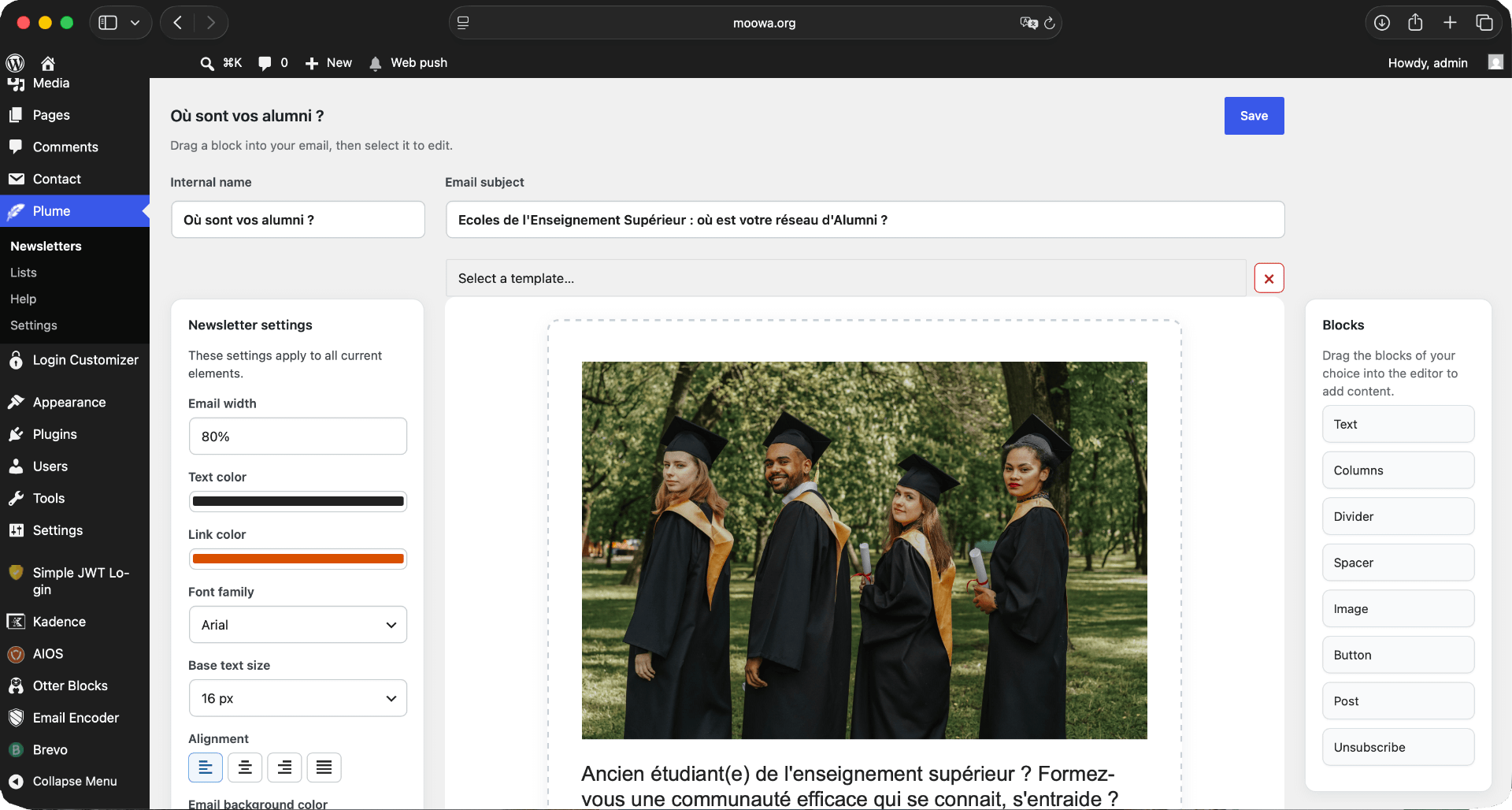
Plume newsletter editor

A visual editor built into WordPress

From the Plume menu in your dashboard, create and edit newsletters block by block. Each element — text, image, button, article — is independent and fully customisable.

  • 8 block types available
  • Global settings (colours, font, background) and per-block overrides
  • Direct WordPress article integration with title, image and excerpt
  • Real-time preview of your layout
  • Reusable template saving
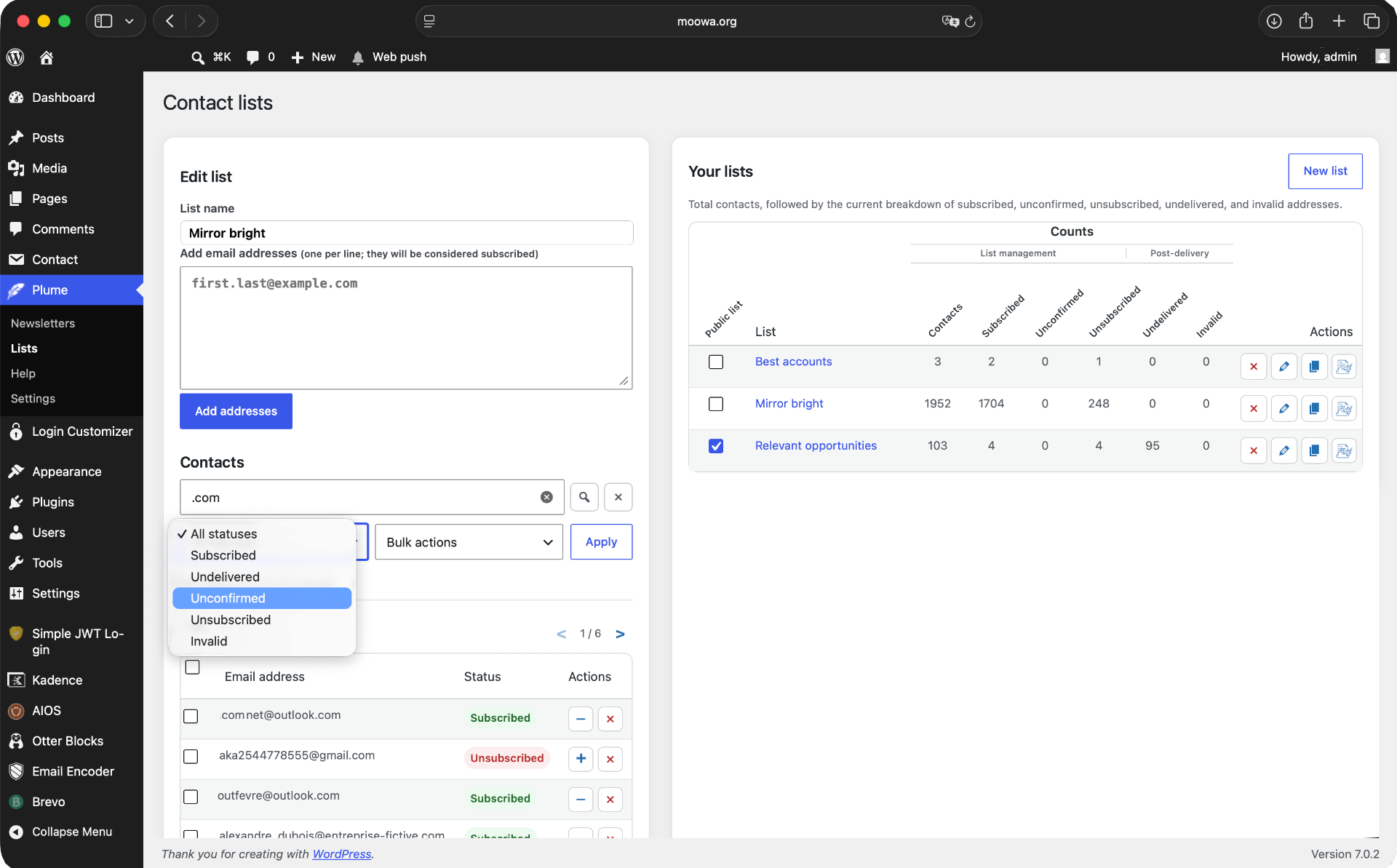
Plume list and contact management

Your mailing lists, neatly organised

The Lists screen gives you a complete view of each list: number of contacts, subscription statuses, delivery history. Import, filter and act in bulk.

  • Public and private lists
  • Address import by copy-paste
  • Status filters: Active, Pending, Unsubscribed, Invalid, Undelivered
  • List management through selections and bulk actions
  • ZIP export of all your contacts
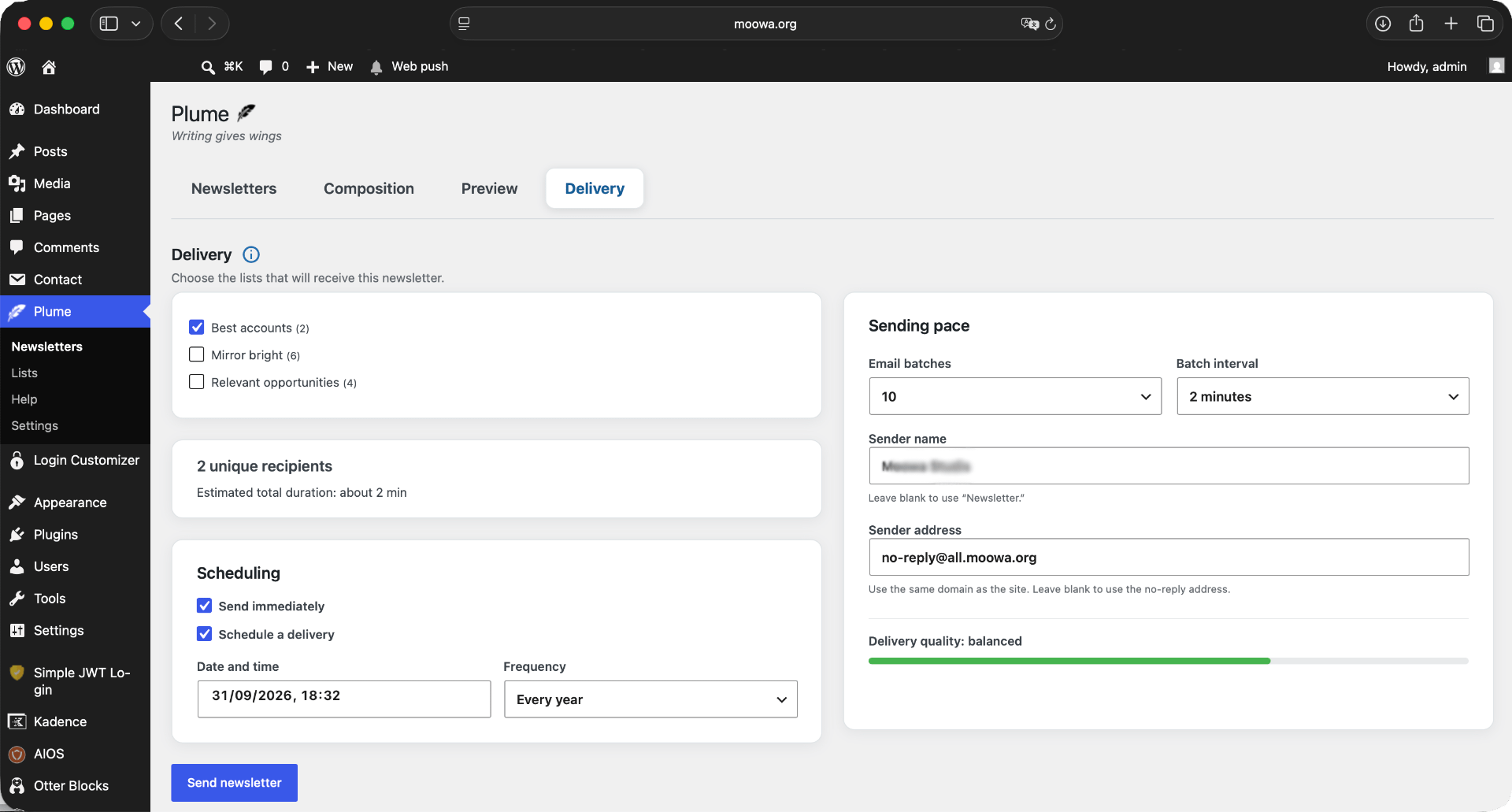
Plume send scheduling screen

Scheduling a send with confidence

Once your newsletter is ready, choose your recipient lists, your sending cadence and the start date. Plume manages the queue in the background — you can close your browser.

  • List selection with automatic deduplication
  • Immediate send or scheduled date
  • Adjustable batch cadence (5 to 100 emails per group)
  • Total estimated send time displayed
  • Cancel an in-progress send at any time
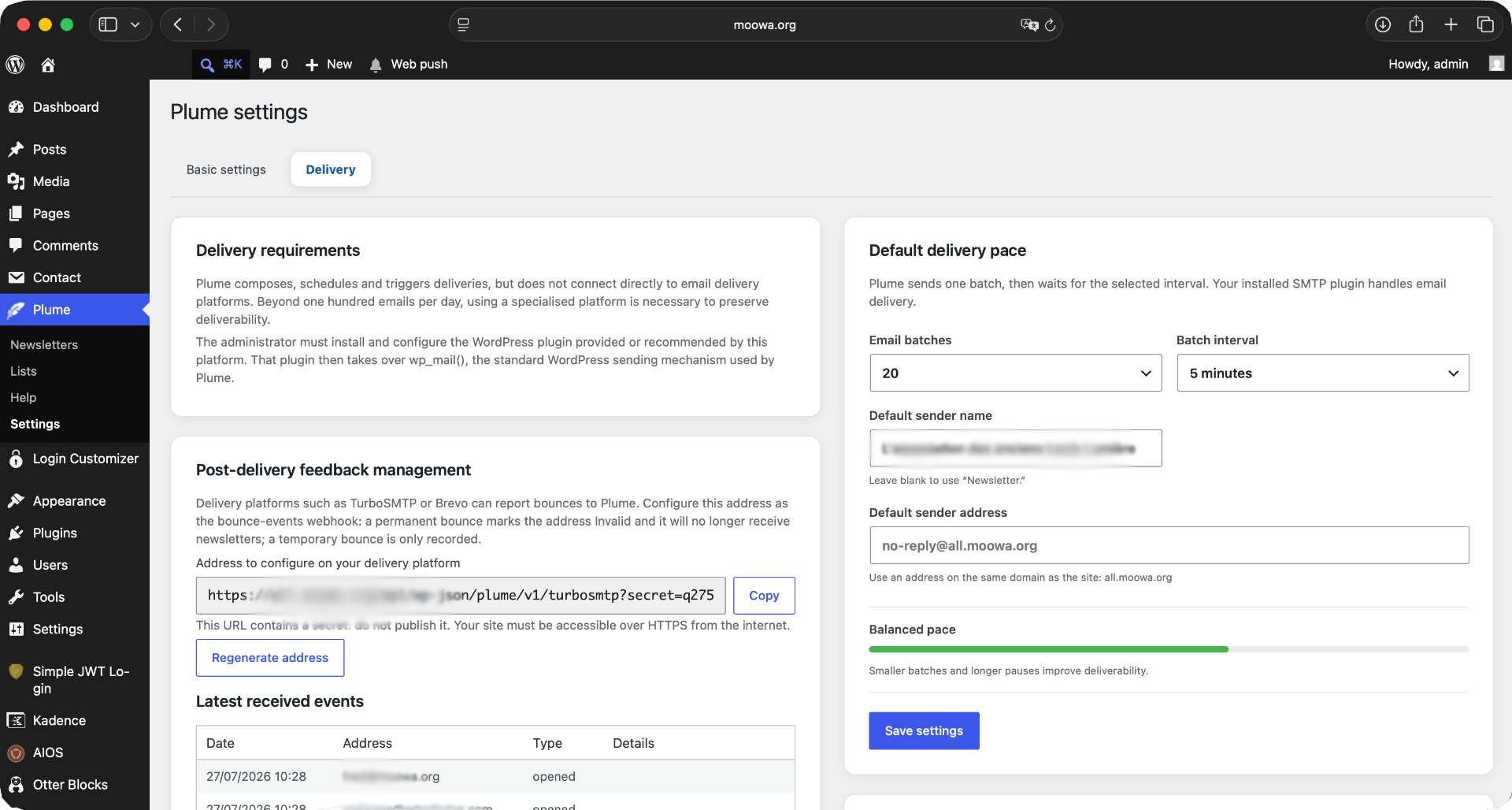
Plume settings and statistics

Statistics & advanced settings

Connect your SMTP platform via the return webhook to automatically receive delivery confirmations, opens and bounces. Export per-campaign statistics whenever you need them.

  • Webhook URL secured by a unique secret key
  • Track opens, clicks and bounces
  • Detailed Excel export per campaign
  • Default sending settings configuration
  • Compatible with TurboSMTP, Brevo, Mailgun and others

Up and running in minutes

Plume installs like any WordPress plugin. No account to create, no subscription to sign up for.

1

Download & Install

From WordPress.org or directly in your site's admin, search for Plume Mailer and activate the plugin.

2

Configure Your SMTP

For reliable delivery, install an SMTP plugin or connect a transactional service (Brevo, TurboSMTP, Mailgun) to your WordPress.

3

Create Your Lists

Add your first lists under Plume > Lists. Decide which ones are public and which are kept for admin use only.

4

Write & Send

Compose your first newsletter with the block editor, choose your recipients and schedule the send. That's all there is to it.

⬇ Download Plume — it's free (available soon)

And because writing shouldn't cost a fortune — Plume is completely free.

No subscription, no locked features, no contact ceiling. Plume is distributed as open source under the GPL licence. Your data stays on your own WordPress server, and you can switch sending platforms whenever you like.

✓ Unlimited contacts ✓ Unlimited campaigns ✓ Unlimited lists ✓ Statistics included ✓ No subscription ✓ Open source (GPL)
⬇ Install Plume — it's free (Available soon)

Plume vs. the alternatives

Competing plugins are often free for small volumes — and expensive once your community grows. Plume has no ceiling.

Feature Plume MailPoet (free) Newsletter (free)
Price Free, no limits Free ≤ 500 contacts & 5,000 emails/month, then paid Free with limited features; paid addons required for advanced use
Sending platform Your choice — any SMTP service compatible with WordPress (Brevo, Mailgun, SendGrid, Amazon SES, TurboSMTP…) MailPoet Sending Service imposed on free plan; third-party providers only on paid plan wp_mail() by default; paid SMTP addon required for advanced providers
Unlimited contacts (paid above 1,000)
Data hosted on your server (MailPoet servers)
Visual block editor ⚠ limited
WordPress article integration with advanced options ⚠ partial
Double opt-in included
Open & click statistics via SMTP webhook ⚠ paid plan
Configurable batch sending
Excel statistics export ⚠ paid